Free plugins for
everyday mixing.

EQ, compression, saturation, de-essing, gating, peak limiting, stereo imaging and transient shaping. Free and complete.

macOS · AU + VST3Windows · VST3
SW EQ
Shape tone with dynamic EQ and per-band audition.

Silent SW EQ preview. The real editor shows a changing spectrum and a dynamic band responding to music, alongside a low cut, shelves and a bell cut.

Edit several tracks from one window

Open Instances in SW EQ, Comp, Limit, Image, or Attack to select and edit another instance of that same plugin. Keep working across tracks without hunting through the mixer.

More details
  • EQ selects other EQ instances; Comp selects other Comp instances; Limit selects other Limit instances; Image selects other Image instances; Attack selects other Attack instances.
  • Instances must run in the same host process to discover one another. Availability can depend on your DAW's plugin hosting settings.
  • Automatic track names depend on host support. Manual instance naming is available; Comp's current documentation notes that manual names reset after a session reload.

Silent SW EQ preview switching from Lead Vocal to Bass in the Instances list. The Bass low shelf is raised from 2 to 5 dB through the same editor.

Hear the difference

Listen to what your processing is doing. On EQ, hear one band's contribution. On Comp, De-Ess, and Limit, hear the difference between the original and processed signal.
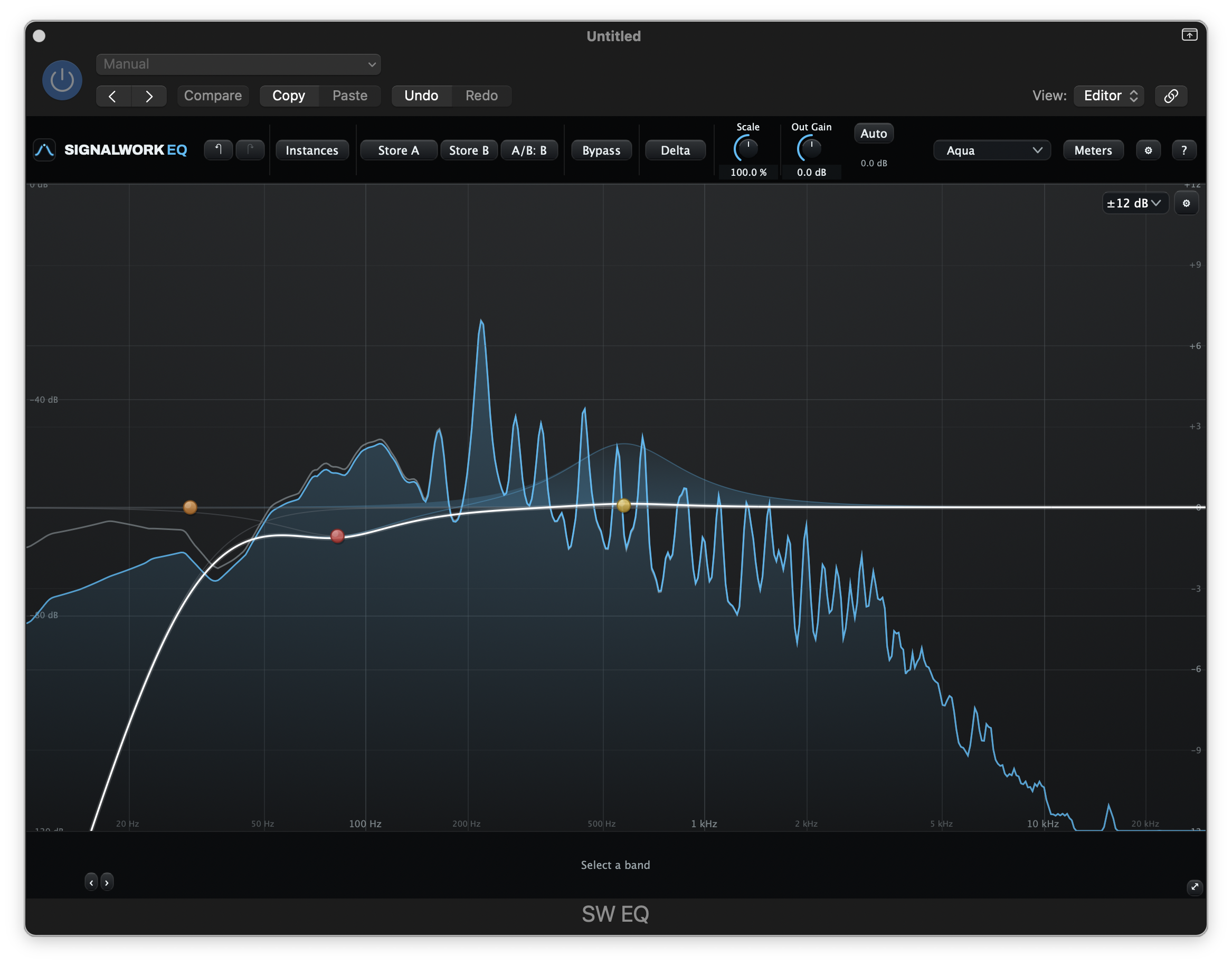
Right click and hold to audition.
SW EQ plugin interface by Signalwork Audio
One band. Just its contribution.

Pursuit of perfection

Good utility plugins need more than a useful feature list. We test and refine the processing behind our plugins, paying close attention to accuracy, unwanted artifacts and consistent performance.

PRECISION

Double-precision EQ

SW EQ uses double-precision filter coefficients and state to keep rounding error low through the filters.

CONTROL

Quality without a setting

SW Color uses automatic internal upsampling to reduce unwanted digital artifacts, with no oversampling setting to manage. Playback and export use the same processing.

VALIDATION

Checks on the audio itself

Internal development tests include frequency response, gain curves, distortion, aliasing, and comparisons that check whether an optimization changes the sound.

A note from the developer

We aim to bring the best features together in each plugin so you can stay in the creative flow without reaching for another tool.

Signalwork Audio standalone Suite plugins are made to be quick, easy to use, and sound great. I'm sharing them with the community for free. Feedback and feature requests are always welcome.

SW EQ

Silent SW EQ preview. The real editor shows a changing spectrum and a dynamic band responding to music, alongside a low cut, shelves and a bell cut.

PARAMETRIC + DYNAMIC EQ

SW EQ

Shape the tone of your track

Make broad tonal changes or work on a single resonance. Then listen to exactly what each band contributes, with true per-band delta audition.

  • Up to 24 bandsBell, shelves, filters, notch, band-pass, and tilt.
  • Dynamic EQ per bandLet a band respond when the signal needs it.
  • Multi-instance editingSelect and adjust other EQ instances from this window.
  • Auto-gainCompare tone with less loudness bias.
More details
  • Zero-latency processing, with smoothed parameter changes.
  • Proportional Q narrows cuts as they deepen.
  • Right click and hold a band to hear its contribution. The headphone control latches the audition.
  • Instances lets you move between open EQs without hunting through the mixer.
  • Accent themes with a Muted colors option, A/B snapshots, and selectable window sizes.
  • Choose Dark or Lighter with Analyzer background in the analyzer settings. The choice is saved per user. Analyzer settings close 2 seconds after the pointer leaves.
SW Comp

Silent SW Comp preview. Input and output histories scroll across the real editor while the gain-reduction trace and meters respond to music.

TRACK COMPRESSION

SW Comp

Compression with a little character

Set the movement and feel of a track with clear level history and gain-reduction feedback. Add saturation when you want some character.

  • Multi-instance editingMove between your Comp instances in the same editor.
  • Clean, Punch, SmoothThree starting points. Your controls stay live.
  • Optional colorBlend in saturation, or leave it fully off.
  • See the dynamicsFollow input, output, and gain reduction together.
More details
  • Peak-to-RMS detector blend, adjustable stereo link, and sidechain filtering.
  • Zero latency with lookahead at zero and HQ off. Optional lookahead and 2x or 4x HQ add latency.
  • Right click and hold in the editor to hear the processing difference.
  • Auto makeup uses a fixed reference from the gain law.
  • Instances lets you switch between open compressors.
SW Color

Silent SW Color preview in Tube mode. The real editor's glow and input and output meters respond to music at a gentle Drive setting.

PREAMP, TUBE + TAPE SATURATION

SW Color

Give your track some character

Bring density, harmonic color, and movement to a track. Choose Preamp, Tube, or Tape, push the central Drive control, then shape how the sound holds together.

  • Three distinct stylesPreamp for density and edge, Tube for warmth and bloom, Tape for rounded weight.
  • Soften or preserveBring up body and soften peaks, or emphasize attacks. Dynamics has its own On/Off switch.
  • Automatic internal upsamplingLess unwanted digital artifacting, with no quality switch to second-guess.
  • Optional Auto GainMatch levels as you compare. Leave it off to keep the natural Drive-related rise.
More details
  • SW Color 1.1.0 is included in the Signalwork Suite for macOS (AU and VST3) and Windows (VST3).
  • Drive, Character, Dynamics, Tone, Mix, and Output are the six main controls. Low and high cuts stay within easy reach.
  • Drive Compensation uses a fixed reference calibration. Auto Gain follows the material you are playing. Both default off.
  • The glow responds to measured saturation activity and input level. Animation is a single switch in Utilities.
  • Freely resize the window, choose an accent theme, compare A/B settings, and toggle hover help with ?. Cmd + click (Ctrl + click on Windows) resets a control to its default. Double click a number to type an exact value.
  • Internal upsampling is automatic oversampling. Playback and export use the same processing; there is no separate export quality mode.
SW De-Ess

Silent SW De-Ess preview at the default window size, with Character visible, Full Band detection and Split processing selected. The waveform and reduction meters respond to music.

VOCAL SIBILANCE CONTROL

SW De-Ess

Tame the esses.
Keep the brightness.

Voice mode is designed to tell a sharp “s” or “sh” from a bright vowel, so you can deal with sibilance without reacting to every bright sound.

  • Voice detectionLooks at more than high-frequency level.
  • Split or WideReduce the sibilant band or the whole signal.
  • Audition as you adjustHear what the detector is catching.
More details
  • Full Band detection is available for non-vocal and complex material.
  • Stereo and Mid/Side processing options.
  • Right click and hold the detection band to hear what is being removed. LISTEN monitors the full detection band instead.
  • Lookahead is adjustable from 0 to 15 ms, with 12 ms as the documented default.
  • The Consonant-to-Ess control changes what the detector responds to.
SW Gate

Silent SW Gate preview. A transfer curve shows the gating settings while the level history and meters respond to louder and quieter passages of music.

GATING + EXPANSION

SW Gate

Less spill.
More of the take.

Reduce quiet noise and spill between the phrases or hits you want to keep. Choose a firm gate or gentler expansion, then set how it opens and closes.

  • Gate or expandSet the amount of separation the track needs.
  • Choose the triggerUse this track or an external sidechain to trigger the gate.
  • Shape the timingDial in attack, hold, release, and lookahead.
More details
  • Threshold and ratio controls cover expansion through hard gating.
  • The transfer-curve display shows the gate response.
  • Consistent themes, tooltips, and selectable editor sizes across the suite.
SW Limit

Silent SW Limit preview in Transparent mode. Input, output and gain-reduction meters respond to peaks in the music.

PER-TRACK PEAK CONTROL

SW Limit

A ceiling for stray peaks

Take care of stray peaks before a track reaches your bus processing. A straightforward peak catcher for individual tracks.

  • A firm sample ceilingSet the output ceiling and control the peaks.
  • Multi-instance editingSelect and adjust other Limit instances in one editor.
  • Adaptive releaseRecovery adjusts to the signal.
  • Linked controlsMove threshold and output together when useful.
More details
  • Transparent, Punch, and Smooth styles change the timing and detection settings.
  • Optional 2x or 4x HQ oversampling and adjustable stereo link.
  • Right click delta audition lets you hear what the limiter is removing.
  • Instances lets you move between open limiters.
  • This is a per-track limiter, not a mastering limiter. It uses lookahead and does not claim zero latency.
SW Image

Silent SW Image preview. On a stereo mix, Width rises from 100 to 160 percent and the stereo field spreads past the speakers, then Mono Range moves from Off to 150 Hz and the low end folds to the center.

STEREO IMAGING

SW Image

Find the width that fits

Set the stereo width, narrow the low end, and see how the stereo field changes across frequencies. Check the correlation meter as you compare.

  • Width from 0 to 200%Move from mono to double the Side level.
  • Mono Range with OffAttenuate low-frequency Side content at 24 dB per octave, or leave it unfiltered.
  • See the stereo fieldFrequency, width and correlation in one view.
  • Instances editingSelect another SW Image in the session from the same window.
Also a module in SW Rack
SW Attack

Silent SW Attack preview. Four band displays show level and applied gain as Attack and Sustain shape the sound. The CEILING light shows when peaks reach the soft ceiling.

FOUR-BAND TRANSIENT SHAPING

SW Attack

Shape the hit. Keep the feel.

Make hits punchier or softer, and the sound between them longer or tighter. Work across four bands, with level and gain changes in view.

  • Four bands, three splitsPlace the frequency boundaries where your track needs them.
  • Attack and SustainShape each band, or move the controls together with LINK BANDS.
  • Ten starting pointsTry a factory preset, then adjust it for your sound.
  • See the shapingFollow four seconds of level and applied gain in each band.
Also a module in SW Rack

SW RACK

Want them all in one window?

Build your chain, repeat modules and keep the controls together in SW Rack.

$15 introductory price

The standalone Suite is free and complete.

See SW Rack
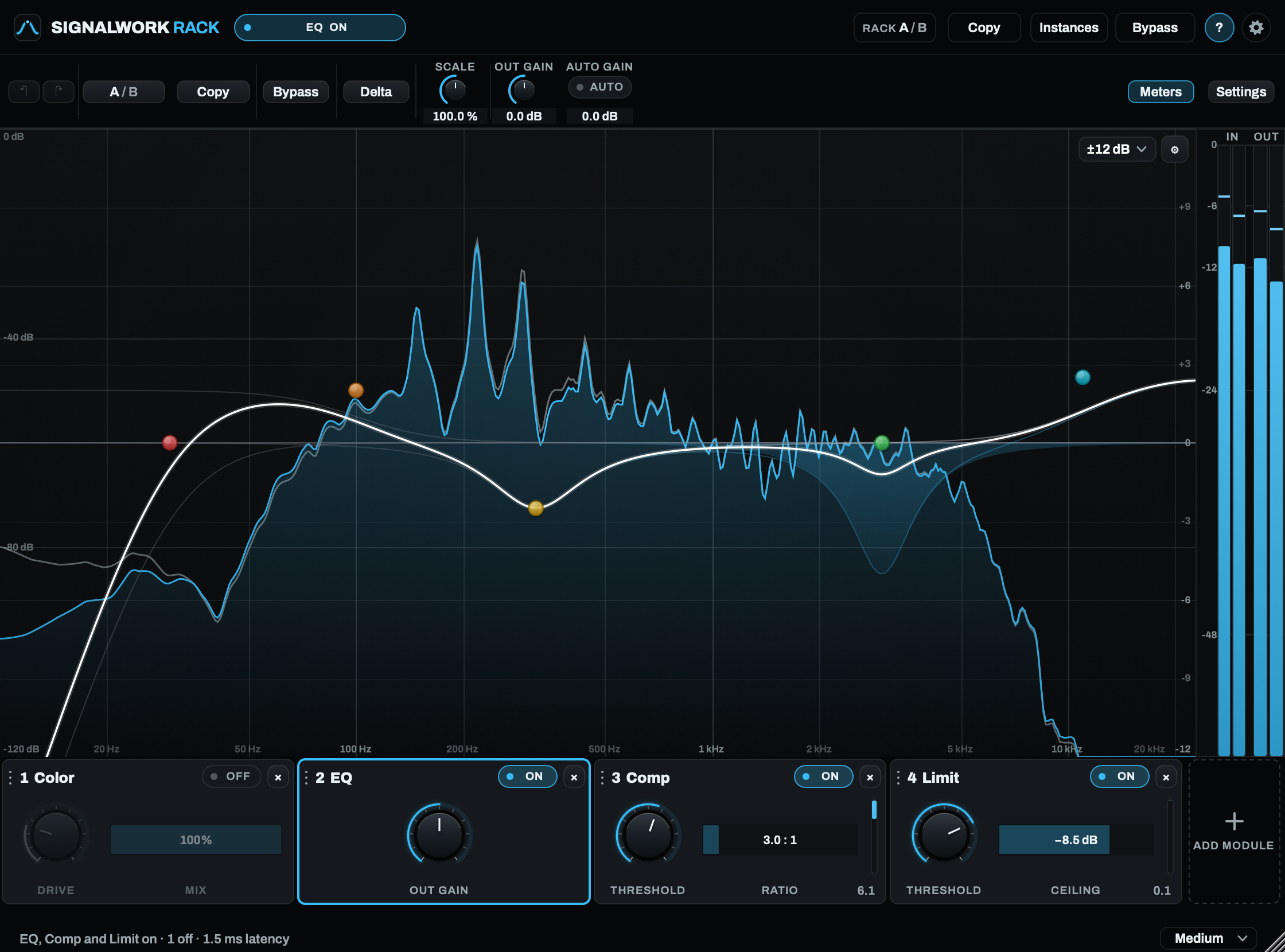
SW Rack with EQ selected and module quick controls underneath

Choose your view

Five themes. Pick what works for you.

Download the suite

The mixing essentials, together in one suite.
Download them and try them in your own session.

Free to use, support appreciated.

Suite 1.3.0

Download for macOS

Universal Mac build
macOS 11 or later
AU + VST3

115.1 MB · .pkg installer

Signed installer.
Notarized.

macOS installation

Requires macOS 11 or later.

  1. Quit your DAW, then open the downloaded installer.
  2. Use Customize to choose your plugins and formats. Installation requires your Mac administrator password.
  3. Reopen your DAW and look for SW EQ, SW Comp, SW Color, SW De-Ess, SW Gate, SW Limit, SW Image, and SW Attack in its plugin list.
Download for Windows

Windows 10 / 11 (64-bit)
VST3 only

29.4 MB · .zip, no installer

Copy the eight .vst3 folders,
then rescan your DAW.

Windows installation
  1. Quit your DAW and extract the downloaded ZIP.
  2. Copy the eight .vst3 folders into C:\Program Files\Common Files\VST3 Each plugin is a folder. Copy the whole folder, including everything inside. Windows will ask for administrator permission; that is expected.
  3. Restart your DAW or rescan its plugins.
User guide PDF · 6.5 MB
Changelog

Suite 1.3.0 (Mac and Windows)

New: SW Attack, a free four-band transient shaper with ten factory presets.

Included versions

SW EQ
2.10.0
SW Comp
1.2.0
SW De-Ess
1.2.0
SW Gate
1.1.0
SW Limit
1.1.0
SW Color
1.1.0
SW Image
1.0.0
SW Attack
1.0.0

Release notes

  • SW Attack is free for Mac AU and VST3 and Windows VST3. Shape the hits with Attack and the sound between them with Sustain, in four bands.
  • Move three split points on the frequency rail. Each band shows its level and the gain being applied.
  • LINK BANDS moves all four bands together, or turn it off to shape each band on its own. Solo bands to hear them.
  • Ten factory presets offer starting points, from Kick Punch to Gentle Glue.
  • An always-on soft ceiling rounds peaks above about -2.5 dBFS toward just below full scale. The CEILING light shows when it is working. Use Bypass to hear the input untouched.
  • Mix, Bypass, A / B compare, themes, sizes and Instances are included.
  • The other seven plugins are unchanged from Suite 1.2.0. Existing projects open as before.
File verification

macOS installer SHA-256:

1a3cac2558e4c0f1dd38bccc6662695bee504d7c6e7fa548e5f21058393f141b

Windows ZIP SHA-256:

2df9bd0c30e0d13ccb05013c0bc1af580361425f20ab2961ba858e5bceead845

Suite 1.2.0 (Mac and Windows)

SW Image joins the Suite: stereo width, low-end control and a stereo field display.

Included versions

SW EQ
2.10.0
SW Comp
1.2.0
SW De-Ess
1.2.0
SW Gate
1.1.0
SW Limit
1.1.0
SW Color
1.1.0
SW Image
1.0.0

Release notes

  • SW Image is a free stereo imaging plugin for Mac AU and VST3 and Windows VST3, with zero added latency.
  • Width runs from mono at 0% to double Side level at 200%. Mono Range attenuates low-frequency Side content at 24 dB per octave, with an Off position.
  • A frequency-based stereo field and correlation meter help you check width and mono compatibility.
  • Balance, Bypass, A/B compare, themes, window sizes and Instances editing are included.
  • The other six Suite plugins are unchanged from 1.1.0. Their existing sessions remain compatible.
File verification

macOS installer SHA-256:

86fbf1b72b26ec7e48e0a916d95e85aae29c700a58750392541b5f666db59f40

Windows ZIP SHA-256:

e1ac4afa89080d26a935907df4b584e5b749698e7df41e33148f8cad36c2b351

Suite 1.1.0 (Mac and Windows)

Refreshed interfaces, an Analyzer background setting in SW EQ, and A/B compare in every plugin.

Included versions

SW EQ
2.10.0
SW Comp
1.2.0
SW De-Ess
1.2.0
SW Gate
1.1.0
SW Limit
1.1.0
SW Color
1.1.0

Release notes

  • All six plugins have a refreshed interface with clearer controls, menus and meters.
  • SW EQ adds Dark and Lighter analyzer backgrounds. SW Color's Animation is now one switch.
  • SW De-Ess: the Character slider now shows at every window size, with its own caption, and Detect, Band and Channels sit in one column.
  • SW Limit: the Instances panel no longer pushes controls off the edge when the window is resized, windows saved at a broken size reopen correctly, and the EDITING label no longer covers HQ.
  • A/B compare in every plugin: A / B flips between two settings, and Copy, clicked twice, copies the side you are on to the other.
File verification

macOS installer SHA-256:

a2d73352cdfb19ebb10092af0705c8390d30e618aba8d2db42c5cf5f3b11b5d8

Windows ZIP SHA-256:

9e9aac0a49878e8307874bb88d01734cf614b7b432e594c9331c12537b45c9d2

Suite 1.0.9 (Windows)

Windows plugins no longer need a separate runtime installation.

Included versions

SW EQ
2.9.8
SW Comp
1.1.7
SW De-Ess
1.1.7
SW Gate
1.0.0
SW Limit
1.0.7
SW Color
1.0.0

Release notes

  • The required runtime is now built into each plugin. On 1.0.8 and earlier a PC without it loaded none of the plugins, and most DAWs gave no reason why they were missing.
  • If you already installed that runtime, you can leave it alone. Other software may be using it.
  • No change to sound, controls or saved settings. The plugins are otherwise identical to 1.0.8.
  • macOS is unchanged at 1.0.8.
File verification

Windows ZIP SHA-256:

5aa9260ecfded9eef48df15bc4da024975768bafca18443e90b55afed2977764

Suite 1.0.8

SW Color joins the suite: Preamp, Tube and Tape saturation with a separate Dynamics control.

Included versions

SW EQ
2.9.8
SW Comp
1.1.7
SW De-Ess
1.1.7
SW Gate
1.0.0
SW Limit
1.0.7
SW Color
1.0.0

Release notes

  • Color includes Drive, Character, Dynamics, Tone, Mix and Output, plus low and high cuts. Soften peaks or preserve attack with Dynamics.
  • Automatic internal upsampling keeps playback and export at the same quality, with no oversampling setting to manage.
  • Optional Drive Compensation and Auto Gain both start off. A reactive glow, freely resizable editor and hover help keep the controls within reach.
  • All six plugins are included for Mac and Windows. The other five plugins are unchanged from Suite 1.0.7.
  • Windows required a separate 64-bit runtime installation. Suite 1.0.9 removes that requirement. The updated PDF guide covers all six plugins.
File verification

macOS installer SHA-256:

d7f031cf3db864a2bcd37e5b89005cc700bed0dc1680fe1f4ea4eb8ba342a191

Windows ZIP SHA-256:

f8dfac291d921374118dbb8bd2c96b00b32f27f085a208c173241a44cae62ec9

Suite 1.0.7

All five plugins now work on mono tracks.

Included versions

SW EQ
2.9.8
SW Comp
1.1.7
SW De-Ess
1.1.7
SW Gate
1.0.0
SW Limit
1.0.7

Release notes

  • Cmd+click (Ctrl+click on Windows) resets a control to its default. Double-click a number to type an exact value.
  • SW Gate is now version 1.0.0.
  • If a plugin doesn't appear after updating, rescan plugins in your DAW.
File verification

macOS installer SHA-256:

585f4c285dc094f9c0d997789940cd02ac7a1ae4258cc51aee521fb0e5a5bb31

Windows ZIP SHA-256:

ce99873d9eb6167be1edda3c3b8b6a08424c348a65b1c619a9f074b5d7abd832

Suite 1.0.6

Adds a Muted colors setting for a softer look.

Included versions

SW EQ
2.9.7
SW Comp
1.1.6
SW De-Ess
1.1.6
SW Gate
0.3.6
SW Limit
1.0.6

Release notes

  • Find it at the bottom of each plugin's theme menu. Mac and Windows. No changes to sound.
File verification

macOS installer SHA-256:

5fa94ed6882581b200f08369d6076b5547db3064b4000d55e2c8fef157ea8928

Windows ZIP SHA-256:

9967cb70749704ee75089c4635db04f74b13921456130c50be112f2f6b9c8c3c

Suite 1.0.5 (Mac)

Fixes the Mac installer.

Included versions

SW EQ
2.9.6
SW Comp
1.1.5
SW De-Ess
1.1.5
SW Gate
0.3.5
SW Limit
1.0.5

Release notes

  • Plugins were installed with permissions that stopped your DAW from reading them, and the build only ran on macOS 26. Both fixed. Now requires macOS 11 or later.
  • Windows is unchanged at 1.0.4.
File verification

macOS installer SHA-256:

cac1d6bba2309fc8245d95c354d5b0df43e1f71f05a4568b5944bd3df4439da0

Suite 1.0.4

Small interface improvements across the suite.

Included versions

SW EQ
2.9.5
SW Comp
1.1.4
SW De-Ess
1.1.4
SW Gate
0.3.4
SW Limit
1.0.4

Release notes

  • No changes to audio processing or saved sessions.
File verification

macOS installer SHA-256:

56348e71eefeb923447bb498a2ab8b1480d565e4f55d6351c77d72cf2f8cac08

Windows ZIP SHA-256:

1def5269cdecd605c92967ab39538ac66a4d39015332994265702f16c1414701

Suite 1.0.3

Click the Signalwork logo in any plugin to see its version and open the downloads page.

Included versions

SW EQ
2.9.4
SW Comp
1.1.3
SW De-Ess
1.1.3
SW Gate
0.3.3
SW Limit
1.0.3

Release notes

  • September 7: the suite is now available for 64-bit Windows in VST3 format, with the same plugins and features.
  • Popup menus now follow the plugin's theme.
  • Audio processing and parameters are unchanged. Existing sessions load as before.
File verification

macOS installer SHA-256:

2950adad9dc1aeedddccc5563670fa126131e4dcae8af59e86ec2d36ffd76ff4

Windows ZIP SHA-256:

d8e2e009f4f6e9ca88f9161cf4a37a52004b3106e2fc0a7816c5d61d458eeb8e

Suite 1.0.2

Updated the publisher name to Signalwork Audio.

Included versions

SW EQ
2.9.2
SW Comp
1.1.1
SW De-Ess
1.1.1
SW Gate
0.3.1
SW Limit
1.0.1

Release notes

  • Some installer screens still show version 1.0.1 and old notarization wording. The included plugins are current, and the installer is signed and notarized.
File verification

macOS installer SHA-256:

966fd53834826e84b186d3d8678d94d7a7958b16072cca3c047a3e16519f5dea

Suite 1.0.1

AU and VST3 plugins for supported Macs. Choose which plugins and formats to install.

Included versions

SW EQ
2.9.1
SW Comp
1.1.0
SW De-Ess
1.1.0
SW Gate
0.3.0
SW Limit
1.0.0

Release notes

  • The installer is signed, notarized, and stapled.
  • The installer closing screen has an outdated sentence saying notarization is pending. This release is already notarized.
File verification

macOS installer SHA-256:

c49a78771a4a70d1612714f128c4ce1762ba8df9f6259d10a24ef7667b2d44d8
Need a hand? Contact support

Support Signalwork Audio

If these tools earn a place in your sessions, a donation helps fund updates and future plugins.

The whole suite is free to use, whether you donate or not.

Support Signalwork Audio

Need a hand with a plugin?

signalworkaudio@gmail.com

Include your DAW, operating system version, plugin name and version, and what happened.